Extract text from a PDF
See the text of every page, then copy it or save it as a .txt file. Scanned pages can be read too. Your file never leaves this device.
or drop a PDF here
Stays on your phone or computer. Only you see it.
Copy the text, page by page
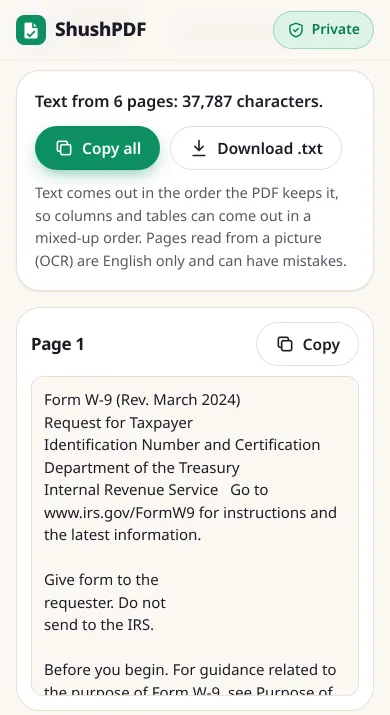
Each page gets its own card with its text in a box. Tap Copy on a page to copy just that page, or Copy all for the whole file. Download .txt saves everything as one plain text file, with a line like "===== Page 2 of 15 =====" before each page, so you can see where each page starts. Long files are read one page at a time, and you can see each page as soon as it is done.
Scanned pages: read the text from the picture
A scan or a photo of a page has no text inside it, only a picture. Those pages say No text found on this page. Tap Read text from this page and we read the words from the picture on your device. This is called OCR (optical character recognition). If there are several such pages, Read all pages without text does them one after the other.
The first time, we tell you before anything is downloaded: the text reader is about 6 MB and comes from our own website, not from another company. Your browser keeps it, so the next time it starts straight away, even without internet. It is never loaded unless you tap the button.
For a photo or a screenshot that is not in a PDF, use Image to Text. To keep the scan as a PDF and make its words searchable in place, use OCR PDF.
Password-protected PDFs
If the PDF asks for a password when you open it, type it here and the text is read as normal. The password is only used on your device, to open the file, and is not saved. To get a copy that never asks for the password again, use Unlock PDF.
What we tested
On 31 October 2026 we ran this page in Chrome at phone size (an automated test on a computer) with real public files, and compared the text with the free pdftotext tool. The match is the share of its words that came out in the same order.
- The "Attention Is All You Need" paper (15 pages): 0.5 seconds, 39,958 characters, 91% match (95% on page 1). Most of the difference is in three pages of word charts at the end.
- IRS Form W-9 (6 pages): 0.3 seconds, 98% match. A copy with the password "test123" asked for it, then gave exactly the same text.
- IRS Publication 15 (59 pages): under 0.8 seconds, 304,274 characters, 94% match. The page used about 6 MB of memory at most while reading it, one page at a time.
- A table from a W3C example and the 5-page Form W-4 with tax tables: every word was there, but the match was 86%, because we keep each table row on one line where
pdftotextgoes down each column. - A scanned 1964 typed memo from the JFK records at the US National Archives (1 page, no text inside): OCR took under 4 seconds, including the 6 MB download, and got 68% of the typed words right and in order. It lost two lines that sit close to the form's printed lines and misread some words, for example "Kemnody" for "Kennedy".
- Offline: after one OCR run, we turned off the internet and reloaded the page. Reading text and OCR both still worked.
What it cannot do
The text comes out in the order the PDF keeps it. That is reading order for most letters, reports and papers, but columns, tables and forms can come out in a mixed-up order.
OCR reads English only and can make mistakes, mostly next to the printed lines of a form and with small, blurry or old typewriter print, so check names and numbers before you use them.
Only plain text is kept. Bold, fonts, pictures and the page layout are not. To keep a page exactly as it looks, save it as a picture with PDF to JPG. To change the words inside the PDF, use Edit PDF.
How it works
- 1Choose your PDF
- 2Wait while each page is read
- 3Tap Copy, Copy all or Download .txt
Questions
Can it get the text from a scanned PDF?
Yes. A scanned page has no text inside it, so it shows No text found on this page. Tap Read text from this page and the words are read from the picture with OCR, on your device. It reads English only and can make mistakes, so check the result.
Is my PDF uploaded to read the text?
No. The text, and the OCR for scanned pages, are read inside your own browser. The only thing downloaded is the text reader itself, from our own website, the first time you use OCR. Your PDF is never sent anywhere.
How big is the OCR download, and does it work offline?
About 6 MB, the first time you tap Read text from this page. Your browser keeps it, so after that OCR starts straight away and also works without internet. Pages that already have text never need it.
Can I get the text from a password-protected PDF?
Yes, if you know the password. Type it when we ask, and the text is read as normal. The password stays on your device and is not saved. We cannot open a PDF without its password.
Why are the columns or tables in the wrong order?
A PDF keeps its text as small pieces, each with its place on the page, in the order the program that made it drew them. That is not always reading order. We join the pieces into lines, which works for normal paragraphs, but text in two columns, tables and forms can come out mixed up, so check those parts.
Is it really free? Do I need an account?
Yes, it is free, with no account, no daily limit and no watermark. Because your device does the work, it costs us almost nothing to run.