Convert PDF tables to Excel
We find the tables in your PDF and show you a preview. Save the one you want as an Excel or CSV file. Your file never leaves this device.
or drop a PDF here
Stays on your phone or computer. Only you see it.
How it finds the tables
We read the text inside your PDF and where each piece of it sits on the page. Rows are text on the same line. Columns come from the lines drawn around the cells, or, in a table without lines, from the gaps that line up from row to row, like the columns of a bank statement or a price list.
A table that goes on over the next page, with the same columns, becomes one table, and a header row printed again at the top of the page is left out. If the PDF has several tables, pick one from the Table list. The preview shows the first 30 rows, so you can check the columns before you save.
Excel or CSV?
Save XLSX makes an Excel file that also opens in Google Sheets, Numbers and LibreOffice. Amounts like "1,234.50", "$-9.00" or "(12)" become real numbers, so you can add them up. Codes with a leading zero, such as "0009", dates and phone numbers stay text, exactly as they are in the PDF.
Save CSV makes a plain text file with commas between the cells, for other programs and imports. It is saved as UTF-8 with a mark at the start that tells Excel so, which keeps letters like é and symbols like € right. To copy all the text of a PDF instead, use PDF to Text.
Your file stays on this device
Everything happens in your browser: the PDF is read, the tables are found and the file is made on your phone or computer, and nothing is uploaded. You can check this yourself. Convert one PDF, then turn on airplane mode or switch off Wi-Fi, reload this page and convert a PDF again: it still works, because there is no server doing the work. On a computer, you can also open your browser's developer tools, go to the Network tab and see that no request carries your file.
What we tested
On 5 November 2026 we ran this page in Chrome at phone size (an automated test on a computer) with real public PDFs. For each one we saved a table as XLSX and CSV, opened the XLSX again with two other programs (LibreOffice and openpyxl) and compared every cell with the CSV, and checked each row of numbers against the same line in the free pdftotext tool. Times are from a test server on the same computer.
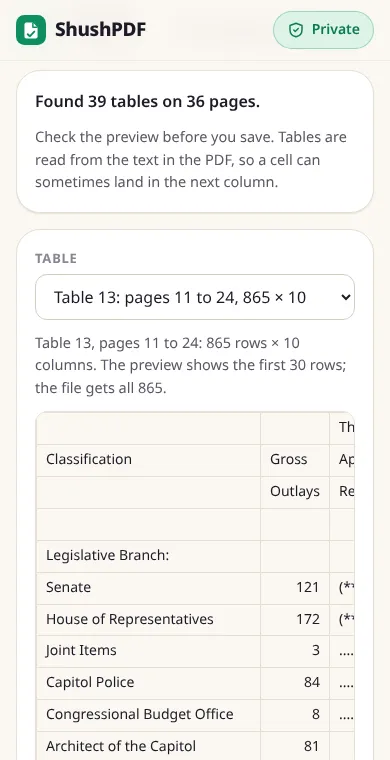
- The US Treasury's Monthly Treasury Statement for September 2024 (40 pages, 3.6 MB): 39 tables in 1.3 seconds. Table 5, the outlays, runs from page 11 to page 24 and came out as one table of 865 rows and 10 columns. All 649 rows with numbers matched, and 4,074 cells became numbers in Excel. Its headers, stacked over three lines, came out over four rows.
- The Federal Reserve's H.4.1 release for the week ended 28 October 2026 (11 pages): the first table, over pages 1 and 2, came out as 48 rows and 5 columns, and all 43 rows of numbers matched. Signs printed apart from their numbers, as in "+ 165,201", were joined to them.
- The USPS Notice 123 price list (63 pages, tables with drawn lines): 184 tables in 2.1 seconds. The Priority Mail Express table on page 4 came out as 43 rows and 10 columns, with 41 of its 42 rows matching; the other was a header row. The two tables printed side by side on that page came out as two tables.
- The IRS 2025 Tax Table (28 pages): 325 tables in 1.6 seconds, as most pages have three tables side by side and each is its own table. The first one, for incomes up to $1,000, came out as 48 rows and 6 columns, and all 42 rows of numbers matched.
- Two sample statements that credit unions publish to explain their layout (Centris FCU and LGE Community Credit Union): the transactions came out as 7 rows each, with date, description, amount and balance in their own columns, and a description that wraps onto a second line stayed in one cell. The LGE amounts end with a minus sign ("1,744.50-"), so they stayed text. On the Centris sample, the notes printed in the margin landed in an extra first column.
- A scanned memo from the JFK records at the US National Archives (1 page, no text inside): the page said No text found in this PDF and that it is probably a scan.
What it cannot do
Scanned PDFs are not supported yet. A scan is a picture of a page with no text inside, so there is nothing for us to read, and we say so. A table that is a picture inside the PDF cannot be read either.
Headers that are stacked over two or three lines, and cells that span several columns, can come out over several rows or in the next column, so check the preview. Two tables printed side by side can come out as one wide table. Amounts written with the minus at the end, like "25.00-", stay text in Excel. Each saved file holds one table.
How it works
- 1Choose your PDF
- 2Pick a table and check the preview
- 3Tap Save XLSX or Save CSV
Questions
Is my PDF uploaded?
No. The tables are found and the Excel or CSV file is made inside your browser, on your device. You can check: convert one PDF, turn off the internet, reload the page and convert again, and it still works. On a computer, the Network tab of your browser's developer tools shows that your file is never sent anywhere.
Can it convert a scanned PDF?
Not yet. A scanned PDF is a picture of each page, with no text inside, so we cannot see the rows and columns. When there is no text, we tell you. A PDF made by a program, such as a bank statement you downloaded or a report saved as PDF, has text inside and works.
Will the numbers work in Excel?
Yes, in the XLSX file. Clear amounts such as "1,234.50", "$-9.00", "(12)" or "4.5%" are saved as numbers, so sums and charts work. Anything that is not clearly a number, like an account code "0009" or a date, stays text as it is in the PDF.
Should I pick XLSX or CSV?
XLSX for Excel, Google Sheets or Numbers: numbers stay numbers and the columns are wide enough to read. CSV for importing into another program, such as accounting software. Both have the same rows and columns.
What if my table goes over several pages?
If the table carries on at the top of the next page with the same columns, we join the pages into one table and leave out a header row that is printed again. The list says which pages a table comes from, for example pages 11 to 24.
Can I use a password-protected PDF?
Yes, if you know the password. Type it when we ask, and the tables are read as normal. The password stays on your device and is not saved.
Is it really free? Do I need an account?
Yes, it is free, with no account, no daily limit and no watermark. Because your device does the work, it costs us almost nothing to run.