Sinhala OCR for scanned and old-font PDFs
ShushPDF reads the Sinhala words on each page and gives you Unicode text to copy, plus a searchable copy of the PDF. It all runs in your browser.
The PDF is read in your browser. No files are uploaded.
How it works
- 1Tap Read a Sinhala PDF. OCR PDF opens with Sinhala picked next to Text in
- 2Tap Choose PDF, then Make searchable (for an old-font PDF, tap Read all pages first)
- 3Tap Download for the searchable PDF, or Copy text to paste the Sinhala into Word
How to get Sinhala text out of a scanned PDF
- Tap Read a Sinhala PDF on this page. OCR PDF opens with Sinhala already picked next to Text in. (On OCR PDF itself, you can pick English, Sinhala or Tamil there.)
- Tap Choose PDF and pick your file. Every page is checked first. A scan says "No text found in these pages".
- Tap Make searchable. The first time, it says it will download the text reader with Sinhala, about 4 MB, from our own website. Your browser keeps it for next time, also without internet.
- Each page is read in turn. You can tap Cancel at any time.
- On "Your PDF is searchable", tap Download for the PDF with the Sinhala words added as invisible text, or Copy text or Download .txt for the words on their own.
For a photo, a screenshot or a picture someone sent you, use Image to Text with Sinhala picked instead. It reads pictures the same way, without making a PDF.
Sinhala PDF to Word: what you really get
ShushPDF does not make a Word (.docx) file. You get two things: the same PDF with the Sinhala words added as invisible Unicode text, so Find, select and copy work, and the plain Sinhala text from Copy text or Download .txt.
Paste that text into Word or Google Docs and it is normal Unicode Sinhala that you can edit and set in any Sinhala font, such as Iskoola Pota or Noto Sans Sinhala. The layout, columns, tables and bold are not kept: you get the words line by line, with a line like "===== Page 2 of 3 =====" before each page.
Old-font PDFs (FM Abhaya and others)
Many Sinhala PDFs, such as older gazettes, were typed with fonts like FM Abhaya. They look right, but the letters inside the file are Latin letters drawn as Sinhala, so copying gives text like "Y%S ,xld m%cd;dka;%sl" instead of "ශ්රී ලංකා ප්රජාතාන්ත්රික".
OCR does not use those letters. It reads the page as a picture, so you get real Unicode Sinhala. Such a PDF already has text, so OCR PDF says the pages already have text: tap Read all pages, then Make searchable. The old letters stay in the PDF as well, so a search can find a word twice.
ShushPDF has no FM Abhaya to Unicode converter that swaps the letters directly. We looked at one, but could not test it on enough real old-font text to trust it, so we left it out.
What we read
Three real scanned pages of Sri Lankan Acts in Sinhala, compared with their hand-corrected Sinhala text. "Words right" counts words that came out exactly as printed, every letter and vowel sign.
| Scan | Words right | Time |
|---|---|---|
| Act No. 4 of 2015, page 12, a clean scan | 257 of 265 | 2.5 s |
| Act No. 36 of 2008, page 9 | 219 of 242 | 2.5 s |
| Act No. 2 of 1988, page 99, old smudged print | 410 of 534 | 3.9 s |
| The same 3 pages as one scanned PDF in OCR PDF | 874 of 1,041, found in the new PDF | 8.4 s |
The first three rows are from Image to Text, with the time from tapping Read text to the result. Counted letter by letter, 99.5%, 96.5% and 95.1% of the letters were right.
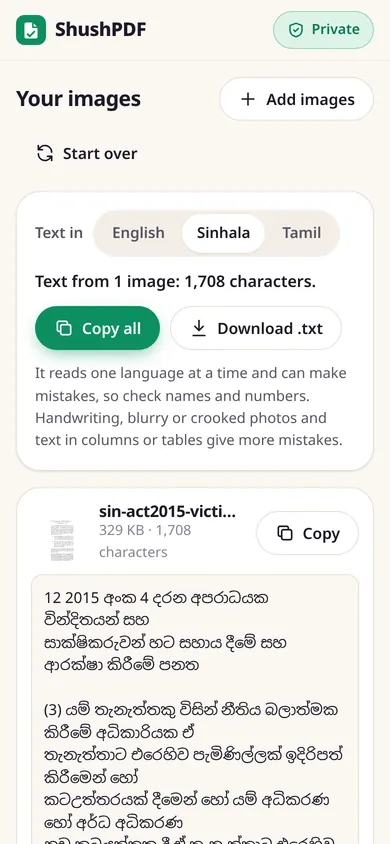
What it cannot do
It reads one language at a time. On a page in Sinhala and English, such as a gazette, the English words come out as nonsense while Sinhala is picked. For those parts, read the page again with English picked.
Very large or decorative headings, faint, blurry or crooked scans give more mistakes, so check names, numbers and dates before you use the text. We have not tested handwriting.
You get text to paste, not a Word file with the layout. Columns and tables can come out in a mixed-up order.
Firefox’s PDF viewer leaves out the invisible joiner of letters like ශ්රී when you copy from the PDF, so they can look split (ශ්රී) after pasting. Copy text and Download .txt keep it.
Photos, and Tamil too
For a photo of a page or a screenshot, use Image to Text, which opens with Sinhala picked. The same tools read Tamil: see Tamil OCR for our results with a Tamil book.
How this page was made: drafted with AI help, tested with ShushPDF on 14 November 2026, and reviewed by the ShushPDF team before publishing.
Questions
Can I convert a Sinhala PDF to Word?
Not into a Word file. ShushPDF gives you the Sinhala as Unicode text: tap Copy text or Download .txt and paste it into Word, where you can edit it in any Sinhala font. The layout, tables and bold are not kept.
Why does copying from my Sinhala PDF give English letters?
It was probably made with an old font such as FM Abhaya, which draws Latin letters as Sinhala. Choose it in OCR PDF with Sinhala picked, tap Read all pages, then Make searchable, and the words are read from the page as real Unicode Sinhala.
Do you convert FM Abhaya to Unicode?
Not letter by letter. We read the page with OCR instead, which works for normal-sized text but can get large headings wrong. We could not test a direct converter on enough real old-font text to trust it, so ShushPDF does not have one.
How accurate is it?
It depends on the scan. On three real scanned pages of Sri Lankan Acts, 257 of 265, 219 of 242 and 410 of 534 words came out exactly right. The last one is old, smudged print. Check names and numbers before you use the text.
Is my PDF uploaded?
No. The pages are read inside your browser, on your phone or computer. The only download is the text reader with its Sinhala model, about 4 MB, from our own website, the first time.
Can it read Sinhala and English on the same page?
Not at the same time. Pick the language most of the page is in. The words in the other language come out wrong, so read the page again with that language picked if you need them.
Is it really free? Do I need an account?
Yes, it is free, with no account, no daily limit and no watermark. Because your device does the work, it costs us almost nothing to run.