Copy Tamil text from photos and scans
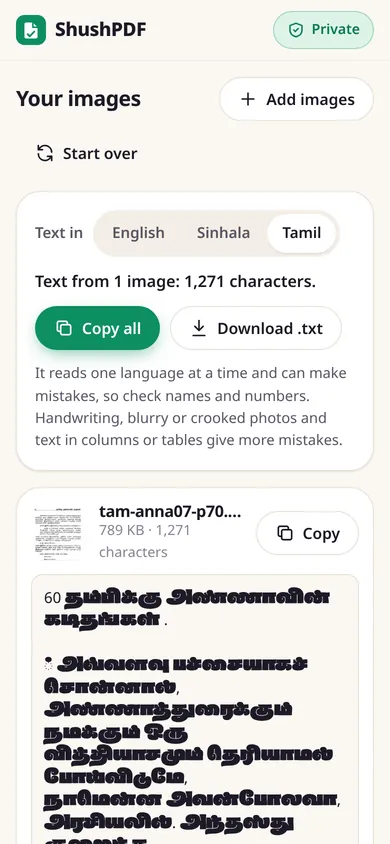
Choose a picture with printed Tamil text and ShushPDF reads it into Unicode text you can copy, edit and search. It all happens in your browser.
Your pictures are read in your browser. Nothing is uploaded.
How it works
- 1Tap Read a Tamil photo. Image to Text opens with Tamil picked next to Text in
- 2Tap Choose images, pick one or more pictures, then tap Read text
- 3Tap Copy, Copy all or Download .txt
How to copy Tamil text from a picture
- Tap Read a Tamil photo on this page. Image to Text opens with Tamil already picked next to Text in. (On Image to Text itself, you can pick English, Sinhala or Tamil there.)
- Tap Choose images and pick a JPG, PNG, WebP or iPhone HEIC picture, or several at once.
- The first time, it says it will download the text reader with Tamil, about 5 MB, from our own website. Tap Read text. Your browser keeps it, so next time reading starts straight away, also without internet.
- Each picture gets a card with its text. Tap Copy on a card, or Copy all for every picture, or Download .txt to save it all as one file.
Picked the wrong language? Tap Tamil above the pictures and they are read again.
Scanned Tamil PDFs
For a scanned PDF, use OCR PDF with Tamil picked. It adds the Tamil words to the PDF as invisible Unicode text, so you can search, select and copy them, and Copy text gives you every page at once. To read only a page or two, PDF to Text has Read text from this page with the same Text in choice.
Text that searches and pastes cleanly
The Tamil model of the text reader we use (Tesseract) puts an invisible mark, a "zero width non-joiner", after every pulli (்): 68 of them on one book page in our test. You cannot see it, but a search for a word typed on a Tamil keyboard does not find a word that has one. ShushPDF removes these marks, so the text you copy, and the text inside a searchable PDF, matches the words as people type them.
You get text to paste, not a Word file with the layout: paste it into Word or Google Docs and edit it in any Tamil font. Lines stay as they are on the page, so you may want to join the lines of a paragraph.
What we read
Pages 60 and 61 of a scanned Tamil book, compared with the text that volunteers typed and checked on Tamil Wikisource. "Words right" counts words that came out exactly as printed.
| Scan | Words right | Time |
|---|---|---|
| Page 60, with Tamil picked | 131 of 134 | 1.8 s |
| Page 61, with Tamil picked | 162 of 167 | 2.0 s |
| Page 60, with English picked | 1 of 134 | 3.2 s |
| Both pages as one scanned PDF in OCR PDF | 273 of 301, found in the new PDF | 3.4 s |
The first three rows are from Image to Text, with the time from tapping Read text to the result. Counted letter by letter, 98.6% and 98.7% of the letters were right with Tamil picked, and 7.8% with English.
What it cannot do
It reads one language at a time. English words inside a Tamil page come out wrong while Tamil is picked, and the other way round.
It reads printed text. We have not tested handwriting or palm-leaf manuscripts. Decorative titles, faint, blurry or tilted photos give more mistakes, so check names and numbers.
Only the words are kept, not the layout. Two columns, tables or text around pictures can come out in a mixed-up order.
Sinhala too
The same tools read Sinhala, including PDFs made with old Sinhala fonts. See Sinhala OCR for our results with Sri Lankan Acts and gazettes.
How this page was made: drafted with AI help, tested with ShushPDF on 14 November 2026, and reviewed by the ShushPDF team before publishing.
Questions
Can I turn a Tamil photo or PDF into Word?
You get Unicode Tamil text to paste into Word, not a Word file. Tap Copy or Download .txt, paste it into Word or Google Docs, and edit it there. The layout is not kept.
How accurate is it?
On two pages of a scanned Tamil book, 131 of 134 and 162 of 167 words came out exactly right. Sharp, straight pictures of printed text work best. Check names and numbers before you use the text.
Which pictures work best?
Screenshots and sharp, straight photos of printed pages, in good light, with the text filling the picture. Small, blurry or tilted text gives more mistakes.
Is my photo uploaded?
No. The text is read inside your browser, on your phone or computer. The only download is the text reader with its Tamil model, about 5 MB, from our own website, the first time.
Why can I search the text I copy?
Because ShushPDF removes the invisible marks that the Tamil reader adds after each pulli (்). Without that, a word you type on a Tamil keyboard would not match the same word in the copied text.
Can it read a scanned Tamil PDF?
Yes, with OCR PDF. It adds the Tamil words to the PDF as invisible text you can search and copy, and gives you all the text with Copy text.
Is it really free? Do I need an account?
Yes, it is free, with no account, no daily limit and no watermark. Because your device does the work, it costs us almost nothing to run.